Fee Settings
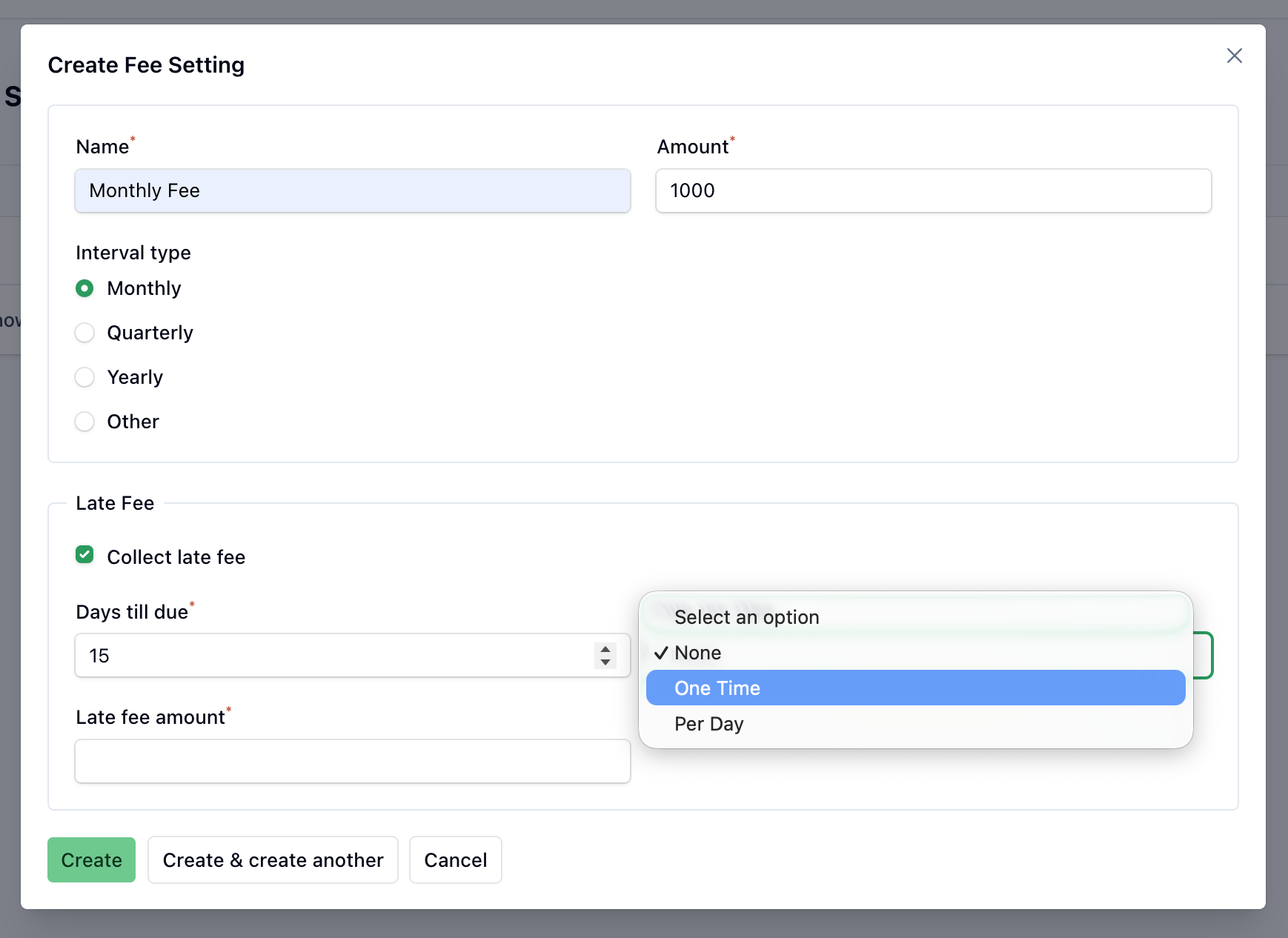
The fees configured for your school are listed here. A fee defines a recurring charge — its name, amount, how often it repeats and, optionally, a late fee.
Basic details
Name
The name of the fee (e.g. Monthly Fee, Term Fee).
Amount
The amount to be paid by the student.
Interval
How often the fee repeats. Pick one of the presets — Monthly, Quarterly or Yearly — or choose Other to enter a custom month interval between 1 and 12.
A monthly fee has an interval of 1.
A quarterly fee (every three months) has an interval of 3.
A fee paid every term of four months has an interval of 4.
When invoices are generated for a fee, one invoice is created for each period in the academic year based on this interval.
Late fee (optional)
Tick Collect Late Fee to charge extra when an invoice is paid late. This reveals:
- Days Till Due — how many days after the fee date the invoice is due. This also sets the invoice's due date and powers the overdue figures in the dashboard and reports.
- Late Fee Type — None, One Time (a fixed charge added once) or Per Day (the charge accrues for each day overdue).
- Late Fee Amount — the value of the late fee.
INFO
After editing a fee, you may be prompted to regenerate invoices so existing students pick up the change.